API
Partner API Overview
Sandbox Testing
Manage Incoming Orders
Manage your Catalog of products
Manage your Promotions
Manage your Outlets
SFTP
Manage your Catalog of products
Manage your Promotions
How to Integrate#
This section covers the basics of how to integrate. Click these links below to access each section of the integration process as required, or simply scroll down the page:
Integration prerequisites#
To successfully integrate Promotions via SFTP, the following requirements must be met:
Onboarding to the Local Shops product stack, including:
Access to the Partner Portal
Access to the Integrations Plugin within the Partner Portal
External Vendor ID Configuration: If using your own vendor IDs, ensure they are correctly configured.
Active Catalog: Items must be successfully associated between our item catalog and vendors in your chain
Valid Credentials: Necessary for accessing our SFTP Central Server. Please request valid credentials from your Account Manager
SFTP Client: Must be capable of pushing CSV files in the specified format, detailed in the ‘File Format section’
Credentials and Access to hungerstation’s Server#
Access an FTP Application/ Software
Have access to an FTP Application/ Software (e.g Filezilla) that will allow you to access hungerstation’s Server.
Host URL:
In the FTP Application you will need to enter: vendor-automation-sftp-live-me.prod.aws.qcommerce.live
Credentials:
User Name
Password
You can request these credentials from your Account Manager to have them created.
Port (communication endpoint) which is always 22, no matter on what chain you are accessing.
File format(s) configurations and limitations#
As you introduced before, there are 3 types of file formats you can adopt.
Below you can learn about configuring each and details about their capabilities and limitations.
Single File Format for Single Vendor
Double File Format for Single Vendor
Double File Format for Multi Vendor
Compliance with at least one of the available file formats as described below is required for a fully-functional SFTP integration To enable proper synchronization, files must follow specific naming conventions:
Please always note, whichever file format you use, it’s incredibly important to name your file properly, otherwise the file synchronisation will not work <prefix>_vendorID.csv for single vendor updates <prefix>.csv for multivendor updates
Single File Format
Both the Assortment & Promotions updates are sent in a single file
This format is designed to update the assortment and/or promotions for a single vendor or store at a time. However, multiple promotions for the same vendor or store can be included, allowing you to create promotions for different dates within a single file.
The update file must be pushed into the Assortment sub-directory.
File naming pattern:
<prefix>_<vendor_id>.csvThe prefix can be any chosen value.
The vendor_id refers to either the External Vendor ID defined in the Partner Portal or the Platform Vendor ID if no External Vendor ID is configured.
File processing time: max. 50 minutes.
Limitations :
Row Limit (rows in the file) : 20K
SKU Limit for each campaign : 19,999
Max File Size : 200MB
Promotions count: 1000 in one file (promotions with different dates)
Format example :
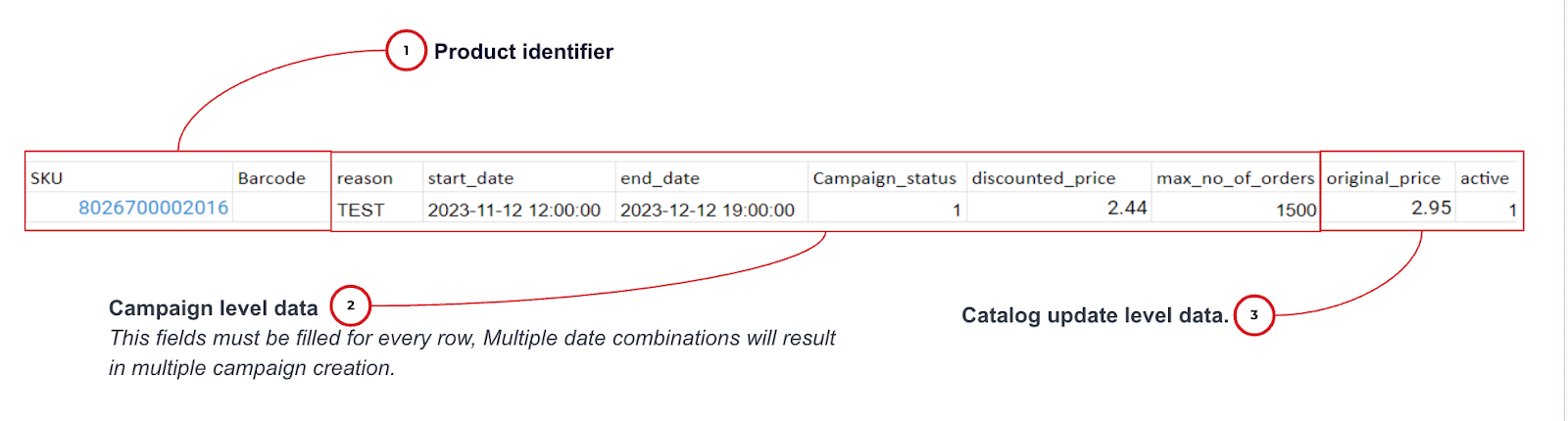
Single File Format for Multipromotion
Assortment and Promotions updates are submitted in one single file.
This format allows you to create multiple types of promotions within a single file. For example, if you want to include both a strikethrough promotion and an item bundle promotion in the same file, you can easily do so with this format.
File naming pattern:
<prefix>_<vendor_id>.csvThe prefix can be any chosen value.
The vendor_id refers to either the External Vendor ID defined in the Partner Portal or the Platform Vendor ID if no External Vendor ID is configured.
File processing time: max. 50 minutes.
Limitations :
Row Limit (rows in the file) : 20K
SKU Limit for each campaign : 19,999
Max File Size : 200MB
Promotions count: 1000 in one file (different promotions)
Format example :

More about each parameter can be found in the use cases section.
Double File Format for Single Vendor
Assortment and Promotions updates are submitted in two separate files.
This format is designed to update promotions for a single vendor or store at a time. However, multiple promotions for the same vendor or store can be included, allowing you to create promotions for different dates within a single file.
The update file for Promotions must be uploaded to the Promotions sub-directory.
File naming pattern:
<prefix>_<vendor_id>.csvThe prefix can be any chosen value
The vendor_id refers to either the External Vendor ID defined in the Partner Portal or the Platform Vendor ID if no External Vendor ID is configured.
File processing time: max. 50 minutes
Limitations:
Row Limit (inclusive of column header) : 20K
SKU Limit : 19,999
Max File Size : 200MB
Promotions count: 1000 in one file (promotions with different dates)
Format example :
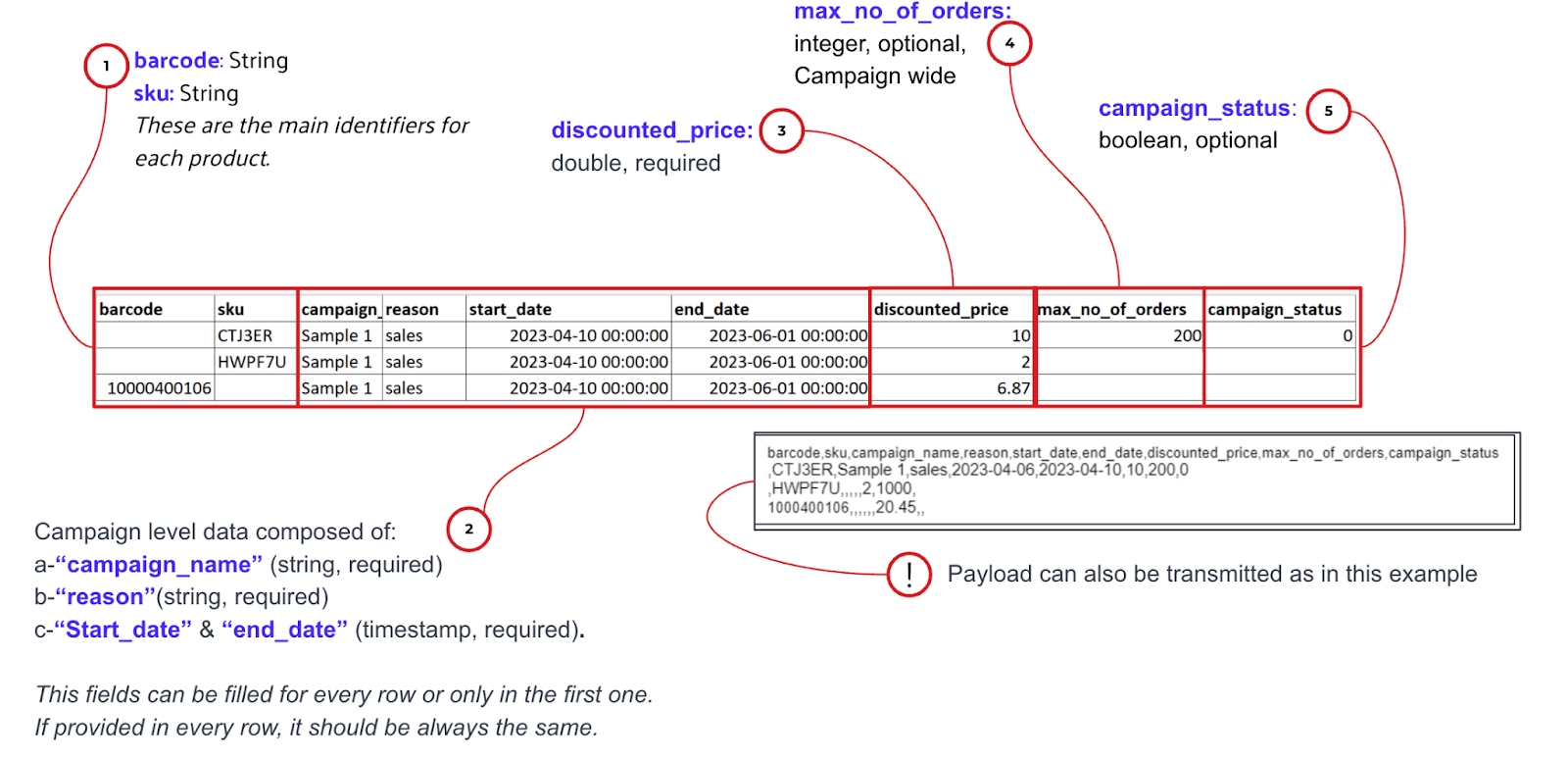
Double File Format for Multipromotion
Assortment and Promotions updates are submitted in two separate files.
This format allows you to create multiple types of promotions within a single file. For example, if you want to include both a strikethrough promotion and an item bundle promotion in the same file, you can easily do so with this format.
The update file for Promotions must be uploaded to the Promotions sub-directory
Partners can include up to 1000 of various promotion groups in a single file
File processing time: max. 50 minutes
Limitations:
Row Limit (inclusive of column header) : 20K
SKU Limit : 99,999
Max number of Products (SKU x Vendors) : 300K
Max File Size : 200MB
Promotions count: 1000 in one file (promotions with different dates)
Format example:

More about each parameter can be found in the use cases section.
Double File Format for Multi Vendor
Assortment and Promotions updates are submitted in two separate files.
This format is designed to update the promotion information for multiple vendors or stores within a single file.
The update file for Promotions must be uploaded to the Promotions sub-directory.
File naming pattern :
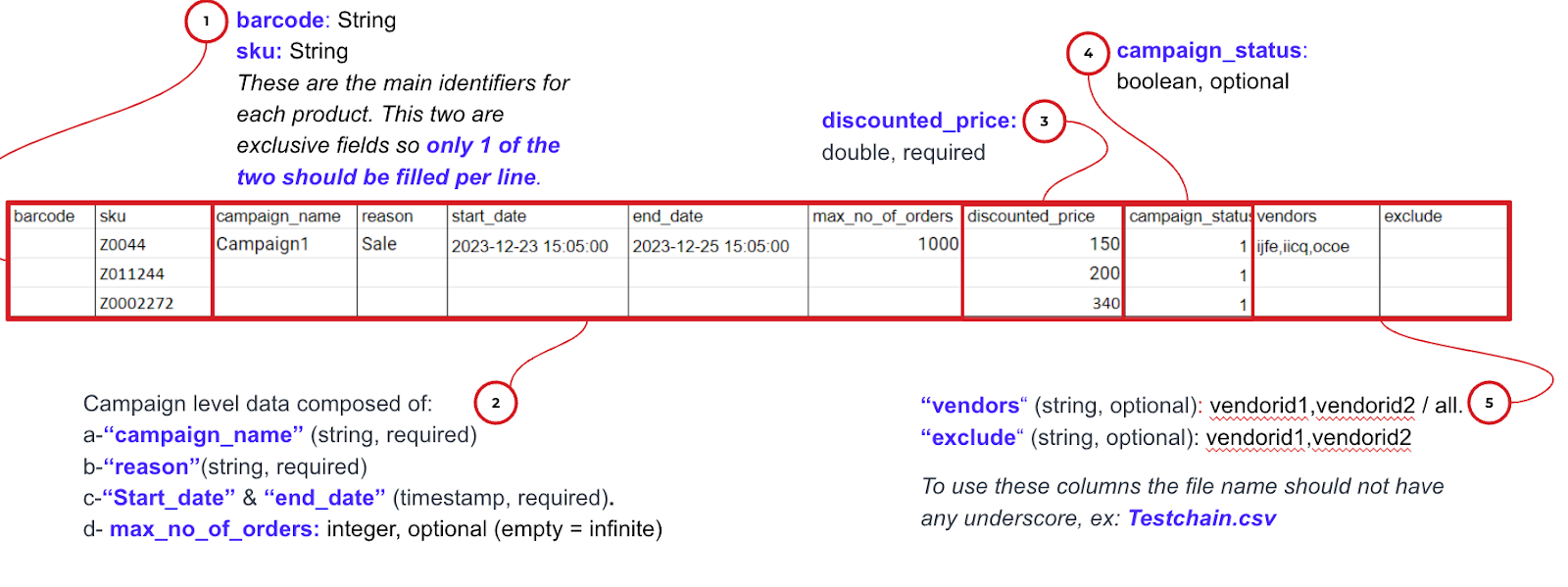
<prefix>.csv, file name should not have any underscore, for example : Testchain.csv
File processing time: max. 50 minutes
Limitations:
Row Limit (inclusive of column header) : 20K
SKU Limit : 99,999
Max number of Products (SKU x Vendors) : 300K
Max File Size : 200MB
Promotions count: 1000 in one file (promotions with different dates)
Format example:
Flexible File Format#
A flexible file format allows you to use your own preferred column names when integrating via SFTP.
Instead of strictly following our default field names, you may request alternative column names in the file.
For example:
If you are using different field names - such asproduct_identifier instead of sku or promotion_price instead of discounted_value- we can definitely accommodate these requests. To do so, you will need to:
Let us know in advance that you would like to use custom field names
Allow time for us to implement the necessary changes on our end
Once completed, you can start using your custom fields in the SFTP file
Please inform us in advance if you plan to use different field names instead of the predefined ones. If custom fields are used without the necessary implementation on our side, the file you create and upload will fail.